



Itinerary Builder for Travel Agents: 8 Features That Connect the Proposal to the Booking
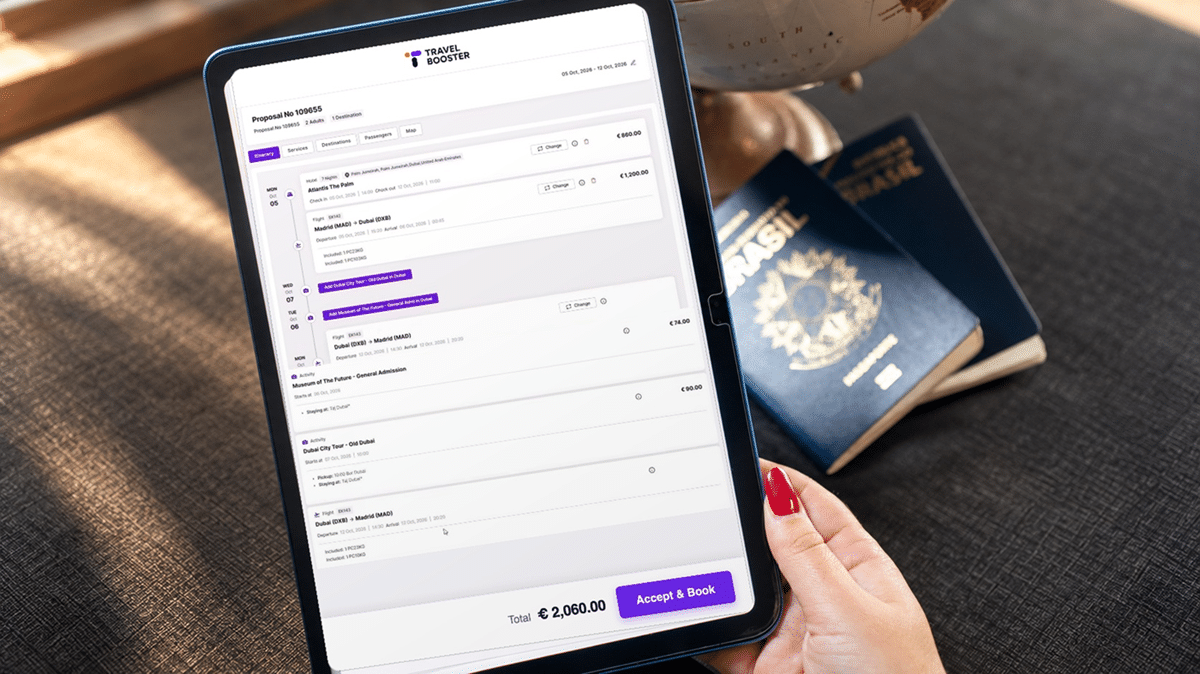
A client asks for ten days in Portugal. You research hotels, sketch a day-by-day plan, design a proposal that looks the part, and send it. The client loves it. Then the second round of work begins: you open the booking system and type the whole trip in again, one segment at a time.
That retyping is where hours disappear and errors creep in. A good itinerary builder for travel agents closes the gap, so the trip you sell is the trip you book. Below, we cover what the tool does, why proposals still get rebuilt, and the eight features that connect the proposal to the booking.
Key Takeaways
- An itinerary builder turns research and supplier content into a client-ready, day-by-day proposal.
- When proposals live outside the booking system, agents retype every segment after approval, which costs time and invites errors.
- The features that matter most keep live pricing, inventory and client data attached to the proposal.
- Once a client approves, the trip should flow into booking, payments and documents with no re-entry.
- Before you buy, ask how the tool connects to your CRM, mid office and suppliers.
What an Itinerary Builder Does for a Travel Agent
An itinerary builder is software that assembles flights, hotels, transfers, activities and notes into one structured trip plan a client can read and approve. It is the bridge between “I have an idea for your trip” and “your trip is confirmed.”
In the sales process, it covers the middle stretch:
- Discovery: capturing what the client wants (dates, budget, travelers, travel style).
- Design: pulling in content and prices, arranging the days, adding descriptions and images.
- Presentation: sharing a branded proposal by link, PDF or mobile view.
- Approval: collecting feedback and revisions until the client says yes.
Standalone tools stop at approval. Connected travel itinerary software keeps going into booking, payment and travel documents. That difference decides how much of your day goes to selling and how much goes to data entry.
Why Proposals Still Get Rebuilt From Scratch
Many agencies still build proposals in Word, a slide tool or a design-first app with no link to their booking engine or mid office. The proposal looks great. It is also a dead end.
Here is what breaks when the proposal lives outside the booking system:
- Double entry. Every flight, room type and transfer gets typed twice: once to sell it, once to book it.
- Stale prices. The rate quoted on Monday may be gone by Thursday, and a static document gives no warning.
- Copy errors. A wrong date or room category carried over from the proposal turns into a costly amendment later.
- Scattered client history. Preferences and past trips sit in the CRM while the proposal sits in a folder. Neither knows about the other.
- Slow revisions. Every change means redesigning the document, so clients wait, and some book elsewhere.
None of this is a design problem. It is a data problem. The fix is travel proposal software that shares a single record of the trip with the rest of your stack, from the CRM to the mid-office workflows that handle invoicing, commissions and supplier payments.
The 8 Features That Matter Most
Plenty of tools can produce a nice-looking PDF. The eight features below are the ones that keep the proposal connected to real inventory, real prices and the client record, so nothing has to be rebuilt later.
1. Live supplier content and pricing
The tool pulls hotel descriptions, photos, flight options and rates straight from connected suppliers and GDS feeds. You stop copying details from supplier sites, and the prices in the proposal reflect what is bookable today.
2. Drag-and-drop day-by-day timeline
Segments sit on a visual timeline you can rearrange in seconds. Move a city, swap a hotel or add a free day, and dates, nights and connections update with it. Revisions take minutes instead of a full redesign.
3. Reusable templates and saved components
Save your best-selling trips, standard transfers and destination write-ups once, then drop them into any new proposal. Repeat requests (a honeymoon in Greece, a family week in Orlando) start most of the way done, not from a blank page.
4. Branded, mobile-friendly client view
Every proposal carries your logo, colors and contact details, and it reads well on a phone. You skip the formatting work, and clients get something that looks like it came from a premium agency, because it did.
5. Client comments and online approval
Clients leave comments on specific days, choose between options and approve the trip from the same link. This replaces long email threads and the “which version are we on?” problem.
6. Dynamic packaging with automatic markup
The tool combines components into one package price and applies your markup rules automatically, without exposing component costs to the client. If you sell packages, our guide to dynamic packaging in travel explains how this protects margin. The time saved here comes from never building pricing spreadsheets by hand.
7. CRM sync and client profiles
Traveler names, passport details, preferences and past trips flow in from the client profile, and the new proposal flows back to it. No retyping passenger data, and every agent sees the full history. For more on this side of the stack, see the best CRM tools for travel agencies.
8. One-click conversion to booking
This is the feature that connects everything. Once the client approves, the same itinerary becomes the booking, with no second round of data entry. It removes the single biggest source of wasted time and copy errors in the sales process.
The 8 features at a glance
| Feature | What it does | What it removes from the agent’s workload |
| Live supplier content and pricing | Pulls descriptions, photos and current rates from suppliers | Copying details from supplier sites and re-checking prices |
| Drag-and-drop timeline | Lets you rearrange days and segments visually | Rebuilding the document for every change |
| Templates and saved components | Reuses trips, transfers and destination content | Writing the same proposals from scratch |
| Branded, mobile-friendly view | Applies agency branding to every proposal automatically | Manual formatting and design work |
| Client comments and approval | Collects feedback and sign-off in one place | Long email threads and version confusion |
| Dynamic packaging and markup | Builds a single package price with your margin rules | Hand-built pricing spreadsheets |
| CRM/system sync | Shares traveler data and history with the client profile | Retyping passenger details and searching old records |
| One-click conversion to booking | Turns the approved proposal into a live booking | Re-entering the whole trip after approval |
Turning an Approved Itinerary Into a Booking
The moment a client says yes is where most tools hand the work back to you. In a connected system, the approval sets off a chain of steps that run on their own:
- Prices and availability are revalidated. The system rechecks every component and flags anything that changed since the proposal went out.
- Reservations are created with suppliers. Flights, hotels, transfers and activities are booked from the same data the client approved.
- A payment request goes out. The deposit or full payment link reaches the client automatically, matched to the trip total.
- A booking file opens in the mid office. Invoices, supplier payables and commissions are created without manual entry.
- Travel documents are generated. Vouchers, e-tickets and the final itinerary go to the client in your branding.
- The client record updates. The system logs the trip, the spend and the preferences for next time.
If any of these steps still needs you to retype information, the proposal and the booking are not truly connected. This is the gap Travel Booster is designed to close.
Watch how it is done on Travel Booster
What to Check Before Choosing an Itinerary Builder
Demos tend to focus on how good the proposal looks. The questions below reveal whether the tool connects to the rest of your travel agency software stack, which is where the real time savings live.
- Where does the content come from? Ask which suppliers, GDS feeds and bed banks are connected, and whether rates are live or cached.
- What happens after approval? Ask the vendor to show, step by step, how an approved proposal becomes a booking. Count every field you would need to retype.
- Does it talk to your CRM? Check that client profiles sync in both directions, not just as a one-time import.
- Does it reach the mid office? Invoices, payables and commissions should be created from the booking automatically.
- How are changes handled? If a client moves a date after booking, does the change flow through to suppliers and accounting?
- Can you control pricing and margin? Look for markup rules by product, supplier or client type, plus package pricing that hides component costs.
- How fast can a new agent use it? A tool your team avoids saves no time at all. Ask for a trial with real trips.
FAQ
What is an itinerary builder?
It is software that helps travel agents assemble flights, hotels, transfers and activities into a structured, day-by-day trip proposal. The agent pulls in supplier content and prices, arranges the days and shares a branded version with the client. The most useful tools also connect to booking, payment and mid-office systems, so the approved trip can be booked without entering it a second time.
Can clients edit a proposal themselves?
In most tools, clients can comment on specific days, choose between options you have offered and approve the trip online. Full editing usually stays with the travel agent, which protects pricing, availability and your margin. This setup gives clients a sense of control while you keep the final say on what gets booked, and it keeps all feedback in one place.
How long should building a proposal take?
It depends on the trip, but templates, saved components and live supplier content shorten the work considerably. A repeat trip type can often be adapted from a template in a short session, while a complex multi-country trip will take longer. The bigger saving comes after approval: a connected tool removes the hours spent re-entering the trip into the booking system.
Do itinerary builders work for group travel?
Yes, but, Group travel has its own needs, so TravelBooster offers a separate solution built for it.
Can an itinerary be branded for the agency?
Most modern tools apply your logo, colors, fonts and contact details to every proposal automatically. Some also support branding per agent or per sub-brand, which helps host agencies and consortia. Branding should carry through to the final documents too, including vouchers and the confirmed itinerary, so the client sees a consistent experience from first proposal to departure.
- Share:


Let's go for a journey
More Resources
-
Blog
-
News
-
Blog